

Babysense PRO vs HD S2: Which Is Best for Multi-room Use?
A head-to-head comparison of the Babysense HD S2 and the Babysense Pro (formerly the MaxView), with the Pro's larger 5.5-inch screen, making split-screen viewing better, and the HD S2 a better value pick for a single nursery setup.




Published July 3, 2026
AI Summary


Choosing the right baby monitor can feel overwhelming, especially when two models look so similar on paper. Babysense has built its reputation on secure, hack-proof monitoring without the privacy risks that come with Wi-Fi-connected devices, and two models sit at the top of that lineup.
Parents frequently compare the Babysense HD S2 vs MaxView because both sit at the higher end of the Babysense range and share a lot of the same core features. This guide walks through what they have in common, where they differ, and which one makes more sense for your nursery setup.
What the Babysense HD S2 and MaxView Pro Have in Common
Before getting into the differences, it helps to know just how much common ground these two monitors share. Whichever you choose, you're starting from a strong foundation.
Feature | Babysense HD S2 | Babysense Pro (MaxView) |
|---|---|---|
Wi-Fi Required | No | No |
Hack-Proof Connection | ✓ FHSS | ✓ FHSS |
Night Vision | ✓ | ✓ |
Two-Way Talk | ✓ | ✓ |
White Noise and Lullabies | ✓ | ✓ |
Temperature Monitoring | ✓ | ✓ |
Remote Pan, Tilt and Zoom | ✓ 360°, 2x and 4x | ✓ 360°, 2x and 4x |
Split-Screen Viewing | ✓ | ✓ |
Multi-Camera Support | Up to 4 cameras | Up to 4 cameras |
Wireless Range | Up to 1,000ft | Up to 1,000ft |
Both monitors run on a fully private FHSS (Frequency Hopping Spread Spectrum) connection, meaning there's no app, no cloud server, and no pathway for anyone to access your baby's feed remotely.
If you've read about Wi-Fi monitor security risks, this is a meaningful feature, and not just a marketing point.
Which Monitor Is Right for You?

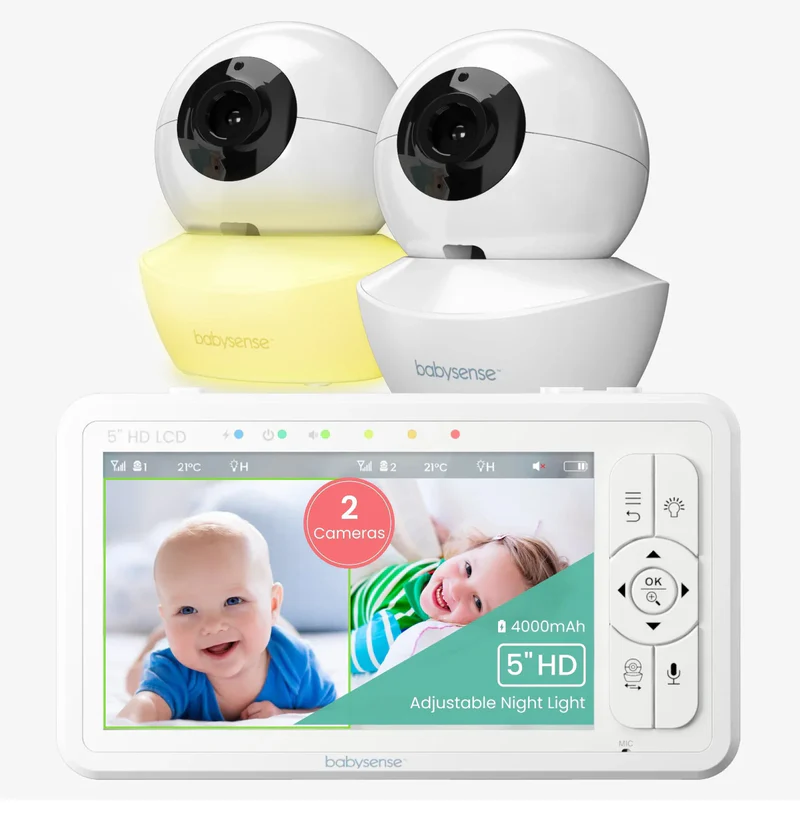
Babysense HD S2
Clear, reliable monitoring without the premium price tag.
Display
Compact 5" HD (720p) screen
Ambient Lighting
Built-in camera night light with 3 adjustable intensity levels
Battery & Power
Reliable 4000mAh rechargeable battery
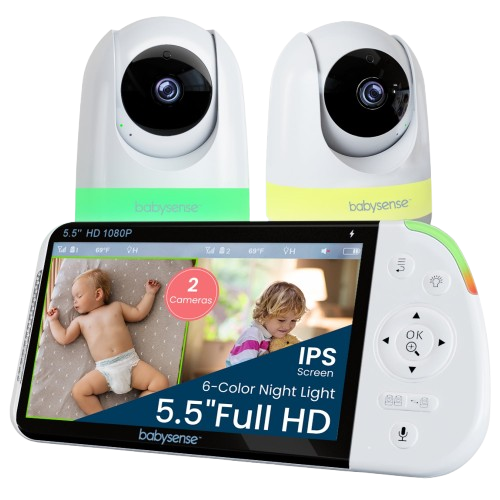
Babysense PRO
The sharpest view in the Babysense range.
Display
Expanded 5.5" Full HD (1080p) display
Custom Lighting
6-color RGB nightlight camera
Multi-Room Audio
Smart SCAN mode
Real-World Differences: Babysense HD S2 vs MaxView
Screen Size and Resolution
The HD S2 has a 5-inch 720p display, which produces a clear, detailed image that handles everyday monitoring confidently.
The MaxView Pro steps up to a 5.5-inch Full HD 1080p screen, which is noticeably sharper, especially when you're checking fine details like facial expressions or breathing patterns in low light.
- HD S2: 5-inch screen, 720p resolution.
- MaxView Pro: 5.5-inch screen, 1080p Full HD resolution.
The half-inch size difference sounds small, but when it's combined with the resolution jump, the MaxView Pro's screen feels more immersive, especially in split-screen mode with two cameras running.
Battery Capacity
Both monitors offer up to 20 hours in eco mode and 12 hours in regular mode, so the difference isn't dramatic on paper. Under heavier use, though, it shows.
- HD S2: 4,000mAh battery.
- MaxView Pro: 5,000mAh battery, a useful buffer during longer or more intensive monitoring sessions.
Nightlight Features
- HD S2: Adjustable ambient night light on the camera, useful for low-level room illumination.
- MaxView Pro: 6-color RGB night light, giving parents more control over color and tone for a calmer, more customizable sleep environment.
Pricing
- HD S2: €179.99 (approx. $195 USD) for the two-camera bundle.
- MaxView Pro: €189.99 (approx. $205 USD) for the two-camera bundle, currently on sale from €229.99 (approx. $248 USD).
Real-World Limitations
A few consistent themes come up from parents using both monitors. HD S2 users praise the clear 720p image and solid overnight battery performance, but some miss the RGB night light customization that the MaxView Pro offers.
MaxView Pro users love the 1080p clarity and larger screen, but flag that the parent unit feels slightly bulkier than expected, the sound-level indicator lights are bright and can't be turned off, and the white noise can occasionally mask quieter signs of fussing before they escalate.
Picking the Right Babysense Monitor
Both the HD S2 and the MaxView Pro share the same secure, hack-proof connection that Babysense is known for. If you want dependable performance at a sensible price for a single nursery, the HD S2 is the smarter pick. If you want the clearest picture, a more comfortable split-screen experience, and RGB night light flexibility, the MaxView Pro is worth the extra investment.
Either way, you're getting a monitor built to give you real peace of mind, night after night.
FAQs
Is the Babysense Pro the same as the MaxView Pro?
Yes, they're the same device. The MaxView Pro was rebranded as the Babysense Pro, so if you've seen both names while researching, you're looking at the exact same monitor.
Which has better image quality, the HD S2 or the MaxView Pro?
The MaxView Pro. It features a 1080p Full HD display on a 5.5-inch screen, compared to the HD S2's 720p on a 5-inch screen. The difference is most noticeable during nighttime monitoring and in split-screen mode.
Do both monitors work without Wi-Fi?
Yes. Both the HD S2 and the MaxView Pro use a non-Wi-Fi FHSS connection, meaning there's no app, no router, and no cloud storage involved. Your baby's feed stays completely private.
Which monitor is better for twins or multiple rooms?
The MaxView Pro. Its larger 5.5-inch screen makes split-screen viewing significantly more comfortable when monitoring two rooms or two children at once.
Can both monitors support more than one camera?
Yes. Both the HD S2 and the MaxView Pro support up to four cameras, making them both suitable for growing families or multi-room setups.
Which monitor offers better value?
It depends on your needs. The HD S2 is the better value pick for a single nursery setup. At its current sale price, the MaxView Pro offers strong value for parents who want a larger screen, better resolution, and more comfortable split-screen monitoring.